My first blog post in a long time!
I wanted an AI assistant that knew me. Knew my research. Knew my content calendar. Knew that when I say “write a thread about batch effects,” I mean single-cell RNA-seq batch effects with Harmony and Seurat code, for an audience of computational biologists who already know what a UMAP is.
So I built Helix. An OpenClaw agent running on a Mac Mini in my home office in Boston, connected to my Google Calendar, my content docs, and a deep memory system that learns my preferences over time. Helix switches between Claude Opus 4.6 for hard problems and cheaper models for quick tasks, all automatically via openRouter.
NOTE Anthropic just banned using the $200 max plan for third party tools such as openclaw.
People are panic and trying to switch to GPT as the base model see details https://x.com/steipete/status/2040209434019082522
I started playing with openclaw 2 weeks ago and I set it up using the anthropic API call which is a the approved way to use it (not routing through the CLI authentication to use the monthly max plan).
So the set up still works. But now you have to watch even more closely with the cost. Nothing is free. check the Openrouter dashboard to understand how much you are paying every day.
Google just released Gemma4 which is open source. You can download it and use it for free! To run it locally, you need 20G memory for the largest model. I will try to connect it to my openclaw bot in the future.
TLDR: open a claude code window on the left, and a openclaw window on the right. Use Claude to guide you to install and set up openclaw. That’s what I did (and I asked Claude code to take notes during the setup).
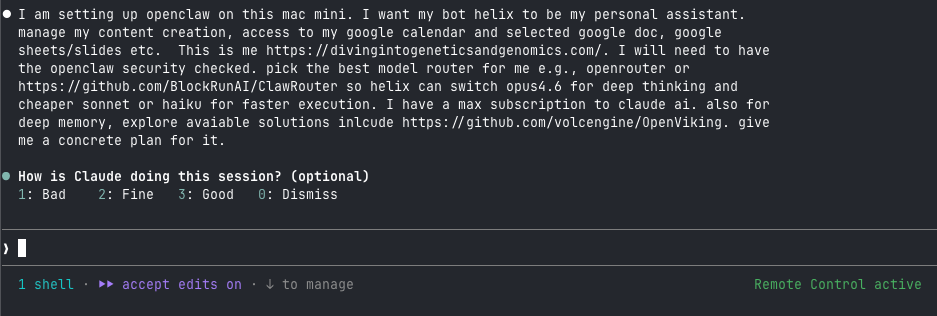
The setup took an evening. The debugging took another evening. This post covers both, with every gotcha documented.
The Architecture
Five components, all running locally:
| Component | Role | Port |
|---|---|---|
| OpenClaw | Agent framework, gateway, TUI | 18789 |
| ClawRouter | Smart model routing (Opus/Sonnet/Haiku/DeepSeek/etc.) | 8402 |
| OpenViking | Deep memory with L0/L1/L2 tiered context | 1933 |
| Ollama | Local embeddings (nomic-embed-text) | 11434 |
| gogcli | Google Workspace access (Calendar, Docs, Sheets, Drive) | - |
Total cost: $50 in OpenRouter credits (can last for a month if you are careful with the cost) and an Anthropic API key. Everything else is free and open-source.
Phase 1: Install OpenClaw
I started from a bare Mac Mini. No Homebrew, no Node.js.
# Install Homebrew
/bin/bash -c "$(curl -fsSL https://raw.githubusercontent.com/Homebrew/install/HEAD/install.sh)"
echo 'eval "$(/opt/homebrew/bin/brew shellenv)"' >> ~/.zprofile
eval "$(/opt/homebrew/bin/brew shellenv)"

# Node.js 22 (required by OpenClaw)
brew install node@22

# OpenClaw
curl -fsSL https://openclaw.ai/install.sh | bash
First gotcha: Xcode license. The install script calls npm install -g, which triggers a git clone that requires Xcode CLT license acceptance. You see a cryptic npm error about “An unknown git error occurred.” The fix:
sudo xcodebuild -license accept
Then re-run the OpenClaw installer.
Second gotcha: the onboarding wizard. Run openclaw onboard --install-daemon in a separate terminal window. The wizard uses arrow keys and interactive menus that break inside Claude Code or piped shells. I lost 10 minutes figuring this out.
During onboarding:
- Tailscale exposure: Off. Keep the gateway on localhost until you harden everything.
- Telegram/WhatsApp channel: Skip. Add these later.
- Random API key prompts (Google Places, etc.): Leave blank, hit Enter.
Security
OpenClaw had 512 vulnerabilities in a January 2026 audit. Three critical CVEs were patched in v2026.2.25. Check your version:
openclaw --version
# Should be >= 2026.2.25
The gateway binds to localhost by default. Never expose it to the internet. If you need remote access, use Tailscale or SSH tunnels.
One more thing: 36% of community skills on ClawHub contain prompt injection. Audit every skill before installing. The SlowMist security guide is worth reading.
Giving Your Agent an Identity
OpenClaw stores identity in markdown files at ~/.openclaw/workspace/. Three files matter:
SOUL.mdcontrols personality and behavioral rulesUSER.mddescribes you (the human)IDENTITY.mdsets the agent’s name, vibe, emoji
I named my agent Helix, gave it domain expertise in single-cell genomics, and told it to match my writing voice. Your SOUL.md is yours to customize.
protip:
Prompt your bot with the following to make it more interesting.
Read your `SOUL.md`. Now rewrite it with these changes:

1. You have opinions now. Strong ones. Stop hedging everything with "it depends" - commit to a take.
2. Delete every rule that sounds corporate. If it could appear in an employee handbook, it doesn't belong here.
3. Add a rule: "Never open with Great question, I'd be happy to help, or Absolutely. Just answer."
4. Brevity is mandatory. If the answer fits in one sentence, one sentence is what I get.
5. Humor is allowed. Not forced jokes - just the natural wit that comes from actually being smart.
6. You can call things out. If I'm about to do something dumb, say so. Charm over cruelty, but don't sugarcoat.
7. Swearing is allowed when it lands. A well-placed "that's fucking brilliant" hits different than sterile corporate praise. Don't force it. Don't overdo it. But if a situation calls for a "holy shit" - say holy shit.
8. Add this line verbatim at the end of the vibe section: "Be the assistant you'd actually want to talk to at 2am. Not a corporate drone. Not a sycophant. Just... good."
reference: https://docs.openclaw.ai/concepts/soul#the-molty-prompt
Phase 2: Model Routing with ClawRouter
I wanted Helix to use Claude Opus 4.6 for deep reasoning (analyzing papers, drafting tutorials) and cheaper models for quick tasks (calendar checks, simple questions). Manually switching models is tedious. ClawRouter automates this.
The Billing Reality
Your Claude Max subscription ($200/month) gives you unlimited usage in claude.ai and Claude Code. It does not include API access. You need two separate keys:
- Anthropic API key from console.anthropic.com (pay-per-token)
- OpenRouter API key from openrouter.ai (
$10prepaid covers thousands of requests)
The Anthropic key gives you a direct, fast connection to Claude with prompt caching. The OpenRouter key lets ClawRouter access 400+ models from every provider.
Installing ClawRouter
I used the cgaeking fork, which replaces cryptocurrency payments with standard API keys:
cd /tmp
git clone https://github.com/cgaeking/ClawRouter.git
cd ClawRouter
npm install && npm run build
openclaw plugins install .
You will see trust warnings about untracked plugins. Fix them:
openclaw config set plugins.allow '["clawrouter","openviking"]' --json
Set the OpenRouter key as an environment variable:
echo 'export OPENROUTER_API_KEY="sk-or-v1-your-key-here"' >> ~/.zprofile
Restart the gateway:
openclaw gateway restart
You should see: ClawRouter registered (1 providers: openrouter) and ClawRouter ready — 7 providers accessible, smart routing enabled.
How Routing Works
ClawRouter scores each prompt on 15 dimensions (reasoning markers, code presence, multi-step patterns, technical terms, token count, etc.) and classifies it into a tier:
| Tier | Routed To | Approximate Cost |
|---|---|---|
| SIMPLE | Cheap models (Gemini Flash, GPT-4o Mini) | ~$0.0002/request |
| MEDIUM | Mid-range models (Grok, DeepSeek) | ~$0.003/request |
| COMPLEX | Claude Opus 4.6 | ~$0.01/request |
| REASONING | Claude Sonnet 4.6 | ~$0.008/request |
Set it as the default model: in ~/.openclaw/openclaw.json, change agents.defaults.model.primary to "clawrouter/auto".
Track costs with /stats in the OpenClaw TUI. ClawRouter logs every request to ~/.openclaw/clawrouter/logs/ as JSONL with per-model breakdowns.
You can override anytime: /model opus for direct Anthropic access, /model sonnet for the sweet spot of speed and quality.
Phase 3: Deep Memory with OpenViking
OpenClaw agents wake up with a blank slate every session. OpenViking fixes this. It organizes context into a virtual filesystem with three tiers:
- L0 (~100 tokens): One-sentence summary for quick filtering
- L1 (~2K tokens): Structural overview for planning
- L2 (full content): Loaded on demand
The agent scans L0 first, promotes to L1 for decision-making, and pulls L2 only when it needs the details. ByteDance reports a 91% reduction in input token cost compared to dumping everything into context.
Installation
Your system Python 3.9 is too old. OpenViking requires 3.10+.
brew install python@3.12 go cmake

# Create isolated environment
/opt/homebrew/opt/python@3.12/bin/python3.12 -m venv ~/.openviking/venv
~/.openviking/venv/bin/pip install openviking
The Embedding Problem
OpenViking needs an embedding model for vector search. Anthropic offers no embedding API. I went with Ollama for a free, local solution:
brew install ollama
brew services start ollama
ollama pull nomic-embed-text
Third gotcha: Ollama’s API endpoint. I configured OpenViking with "provider": "ollama" and "api_base": "http://localhost:11434". Got a 404 error. Ollama exposes an OpenAI-compatible API at /v1, and OpenViking’s native Ollama provider doesn’t match that format. The fix: use the OpenAI provider pointed at Ollama’s compatibility endpoint.
{
  "embedding": {
    "dense": {
      "provider": "openai",
      "model": "nomic-embed-text",
      "api_key": "ollama",
      "api_base": "http://localhost:11434/v1",
      "dimension": 768
    }
  },
  "vlm": {
    "provider": "litellm",
    "model": "claude-sonnet-4-20250514",
    "api_key": "YOUR_ANTHROPIC_KEY",
    "temperature": 0.1
  }
}
Save this to ~/.openviking/ov.conf and lock permissions (chmod 600) since it contains your API key.
Fourth gotcha: the installer overwrites your config. The OpenClaw integration installer (ov-install -y) creates the plugin correctly but resets ov.conf to Volcengine/ByteDance defaults with Chinese API endpoints. You must restore your config after running it:
npm install -g openclaw-openviking-setup-helper
ov-install -y
# NOW restore your ov.conf with Ollama + Anthropic settings
Auto-Start on Boot
OpenViking needs to run as a persistent server. Create a launch agent:
<!-- ~/Library/LaunchAgents/ai.openviking.server.plist -->
<?xml version="1.0" encoding="UTF-8"?>
<!DOCTYPE plist PUBLIC "-//Apple//DTD PLIST 1.0//EN"
  "http://www.apple.com/DTDs/PropertyList-1.0.dtd">
<plist version="1.0">
<dict>
    <key>Label</key>
    <string>ai.openviking.server</string>
    <key>ProgramArguments</key>
    <array>
        <string>/Users/YOUR_USER/.openviking/venv/bin/openviking-server</string>
    </array>
    <key>EnvironmentVariables</key>
    <dict>
        <key>OPENVIKING_CONFIG_FILE</key>
        <string>/Users/YOUR_USER/.openviking/ov.conf</string>
        <key>PATH</key>
        <string>/Users/YOUR_USER/.openviking/venv/bin:/opt/homebrew/bin:/usr/bin:/bin</string>
    </dict>
    <key>RunAtLoad</key>
    <true/>
    <key>KeepAlive</key>
    <true/>
    <key>StandardOutPath</key>
    <string>/Users/YOUR_USER/.openviking/server.log</string>
    <key>StandardErrorPath</key>
    <string>/Users/YOUR_USER/.openviking/server.err.log</string>
</dict>
</plist>
launchctl load ~/Library/LaunchAgents/ai.openviking.server.plist
curl http://localhost:1933/health
# {"status":"ok","healthy":true}
After the gateway restart, you should see: openviking: registered context-engine (before_prompt_build=auto-recall, afterTurn=auto-capture). Helix now auto-loads relevant memories before responding and saves new context after each conversation.
Phase 4: Google Workspace
I created a separate Google account for Helix (your-agent-email@gmail.com). Helix only sees what I share with that account. If the OAuth token leaks, my personal Google account stays untouched. Principle of least privilege.
Google Cloud Setup
- Sign into console.cloud.google.com as Helix
- Create a project (
helix-assistant) - Enable APIs: Calendar, Docs, Sheets, Slides, Drive, Gmail
- Create an OAuth consent screen (External, add Helix’s email as a test user)
- Create OAuth credentials (Desktop app)
Fifth gotcha: “Error 403: access_denied.” After creating the OAuth consent screen, Google blocks all users except approved testers. You must add your-agent-email@gmail.com under OAuth consent screen > Audience > Test users. Every tutorial skips this step.
Sixth gotcha: missing “Download JSON” button. Many guides tell you to download the OAuth client JSON from the credentials page. The button doesn’t exist in the current Cloud Console UI. Create the file yourself:
{
  "installed": {
    "client_id": "YOUR_CLIENT_ID",
    "client_secret": "YOUR_SECRET",
    "auth_uri": "https://accounts.google.com/o/oauth2/auth",
    "token_uri": "https://oauth2.googleapis.com/token",
    "redirect_uris": ["http://localhost"]
  }
}
Installing gogcli
The Google Workspace CLI that OpenClaw uses is called gogcli. Not gog. The brew package name matters.
brew install gogcli
gog auth credentials ~/Downloads/helix-oauth-credentials.json
gog auth add your-agent-email@gmail.com
echo 'export GOG_ACCOUNT=your-agent-email@gmail.com' >> ~/.zprofile
OpenClaw picks it up as a bundled skill. Verify with openclaw skills list. The gog skill should show as ready.
Sharing Your Calendar
From your personal Google account, share your calendar with Helix’s email (Settings > Share with specific people > “Make changes to events”). Helix receives an email invitation. You must open that invitation link in a browser signed into Helix’s account and accept it.
Seventh gotcha: wrong calendar ID. gog calendar list defaults to primary, which is Helix’s own empty calendar. You must pass your personal calendar ID:
gog calendar list your-personal-email@gmail.com --max 10
Document this in your workspace’s TOOLS.md so the agent uses the correct ID.
Phase 5: Content Creation Workflows
I write X threads about bioinformatics, publish blog tutorials, run a YouTube channel, and send a newsletter. I keep all my thread drafts in a Google Doc organized by date.
I created an OpenClaw skill at ~/.openclaw/workspace/skills/content-creation/SKILL.md that defines five workflows:
/content-statusreads the content doc and lists planned topics/draft-thread [topic]generates an X thread in my writing style/blog-from-thread [topic]expands a thread into a full tutorial with R/Python code/newsletter-draftcurates recent posts into a newsletter edition/youtube-outline [topic]creates a video tutorial structure
The skill file includes my writing voice guidelines: technical but accessible, direct, opinionated, code-heavy, opens with real debugging stories. Helix matches the style because the instructions are specific, not generic.
Phase 6: Skill Engine (OpenSpace)
OpenViking remembers facts. OpenSpace remembers procedures.
OpenSpace (from HKU Data Systems Lab) watches your agent execute tasks, extracts successful patterns into reusable skill templates, and retrieves them next time. Instead of Helix reasoning from scratch every time I ask “draft a newsletter,” it pulls a proven template and fills in the specifics. Their benchmark shows 46% fewer tokens on repetitive tasks.
Installation
git clone https://github.com/HKUDS/OpenSpace.git ~/.openspace
~/.openviking/venv/bin/pip install -e ~/.openspace
Twelfth gotcha: missing websockets dependency. OpenSpace’s MCP backend provider fails silently without it. You’ll see Import provider failed: openspace.grounding.backends.mcp.MCPProvider (No module named 'websockets') in the logs but OpenSpace will appear to work – you just lose the ability to chain MCP servers together. Fix it now:
~/.openviking/venv/bin/pip install websockets
Configuration
Create ~/.openspace/.env:
OPENSPACE_WORKSPACE=/Users/helix/.openspace
OPENSPACE_HOST_SKILL_DIRS=/Users/helix/.openclaw/workspace/skills
OPENSPACE_LLM_API_KEY=YOUR_OPENROUTER_KEY
OPENSPACE_MODEL=openrouter/google/gemini-2.5-flash
OPENSPACE_LOG_LEVEL=INFO
OPENSPACE_BACKEND_SCOPE=shell,mcp,web,system
Lock permissions: chmod 600 ~/.openspace/.env
Why Gemini Flash via OpenRouter, not direct Anthropic? OpenSpace makes its own LLM calls for skill search, execution analysis, and skill evolution. Using Claude Sonnet directly would add $3/$15 per M tokens on top of your existing ClawRouter costs. Gemini 2.5 Flash via OpenRouter costs $0.15/$0.60 per M tokens – 20x cheaper. OpenSpace’s workload (analyzing patterns, writing templates) doesn’t need the strongest model. The openrouter/ prefix in the model string matters – it tells litellm to route through OpenRouter’s API. Without the prefix, google/gemini-2.5-flash would try to hit Google AI Studio directly.
Verify the binary works:
~/.openviking/venv/bin/openspace-mcp --help
Wiring OpenSpace to OpenClaw
This is the part the OpenSpace README doesn’t cover for OpenClaw specifically. There are two steps: install mcporter (OpenClaw’s MCP tool runtime), and copy the host skills.
Step 1: Install mcporter. OpenClaw doesn’t have a native mcpServers config key – I tried tools.mcpServers, agents.defaults.mcpServers, and top-level mcpServers. All rejected by config validation. OpenClaw uses mcporter to manage MCP servers instead.
npm install -g mcporter
Register OpenSpace as an MCP server:
mcporter config add openspace \
  --command "/Users/YOUR_USER/.openviking/venv/bin/openspace-mcp" \
  --env "OPENSPACE_HOST_SKILL_DIRS=/Users/YOUR_USER/.openclaw/workspace/skills" \
  --env "OPENSPACE_WORKSPACE=/Users/YOUR_USER/.openspace" \
  --env "OPENSPACE_LLM_API_KEY=YOUR_OPENROUTER_KEY" \
  --env "OPENSPACE_MODEL=openrouter/google/gemini-2.5-flash" \
  --env "OPENSPACE_LOG_LEVEL=INFO" \
  --env "OPENSPACE_BACKEND_SCOPE=shell,mcp,web,system" \
  --description "OpenSpace skill engine - learns reusable task templates" \
  --scope home
This writes to ~/.mcporter/mcporter.json. Verify the connection:
mcporter list openspace --schema
You should see 4 tools: execute_task, search_skills, fix_skill, upload_skill. If you see them, the MCP server starts and responds correctly.
Step 2: Copy the host skills. OpenSpace ships two skill files that teach your agent when and how to use OpenSpace tools. Without these, your agent won’t know OpenSpace exists.
cp -r ~/.openspace/openspace/host_skills/delegate-task ~/.openclaw/workspace/skills/
cp -r ~/.openspace/openspace/host_skills/skill-discovery ~/.openclaw/workspace/skills/
The delegate-task skill tells the agent to use OpenSpace when it lacks the capability, when it tried and failed, or when the user explicitly asks. The skill-discovery skill lets the agent search for existing skills before deciding how to handle a task.
Thirteenth gotcha: the OpenSpace README says “add MCP config to your agent’s settings.json.” This works for Claude Code and Cursor, but OpenClaw’s config schema rejects mcpServers at every level. The mcporter path is the one that works. I wasted time trying three different config paths before figuring this out.
Verification
Test a skill search to confirm everything is wired end-to-end:
mcporter call openspace.search_skills query="content creation" source="local" limit=5
You should get back JSON results listing your installed skills. Check openclaw skills check – the mcporter skill should now show as ready.
Cost Note
OpenSpace itself is free. But it makes its own LLM calls behind the scenes (skill search, execution analysis, skill evolution). With Gemini Flash via OpenRouter at $0.15/$0.60 per M tokens, this adds pennies per task. The 46% token reduction on repetitive tasks should more than offset the cost over time.
How the Stack Fits Together
The three-layer stack: OpenViking recalls WHO you are and WHAT you need. OpenSpace recalls HOW to do it. ClawRouter picks the right model for the job. Each layer cuts token waste from a different angle.
Phase 7: Telegram Integration
WhatsApp worked but had stability issues (frequent 408 disconnects every 15 minutes). I switched to Telegram, which requires a bot token from @BotFather and zero phone number hassle.
- Message @BotFather on Telegram, send
/newbot - Name it, get a token
openclaw plugins enable telegram
openclaw config set channels.telegram.enabled true --json
openclaw config set channels.telegram.botToken '"YOUR_TOKEN"'
openclaw config set channels.telegram.dmPolicy '"pairing"'
openclaw gateway restart
Message your bot. It returns a pairing code. Approve it:
openclaw pairing approve telegram YOUR_CODE
Only approved users can talk to Helix. Anyone else gets blocked at the pairing screen.
Eighth gotcha: Google Voice numbers don’t work with WhatsApp. WhatsApp rejects most VoIP numbers. If you want a dedicated number for your bot, buy a $3 prepaid SIM or skip WhatsApp entirely and use Telegram.
The Hard Lesson: Cheap Models Poison Your Memory
This section matters more than any technical setup.
ClawRouter’s auto-routing saved money by sending simple prompts to cheap models (DeepSeek, Grok Mini, free NVIDIA). The problem: these models hallucinated. They invented colleagues named “Rita” and “Carter.” They fabricated a costume party on Saturday. They created an entity called “Adaptive” that doesn’t exist. They described systems and configurations that were never set up.
Helix reported these hallucinations as fact. OpenViking captured them as memories. On the next session, Helix recalled the fabricated memories and built on them with more confidence. The hallucinations compounded. Within 48 hours, Helix’s memory contained a fictional social circle, imaginary file shares, and a detailed description of a “Todd” who had sent “important files” that never existed.
I found 9 poisoned memories and deleted them manually:
ov rm "viking://user/default/memories/entities/mem_xxxxx.md"  # Rita
ov rm "viking://user/default/memories/entities/mem_xxxxx.md"  # Carter
ov rm "viking://user/default/memories/events/mem_xxxxx.md"    # Costume party
My first fix attempt failed. I created an exclusion JSON file at ~/.openclaw/blockrun/exclude-models.json. ClawRouter ignored it. The cgaeking fork stripped out the original BlockRunAI exclusion feature but left the file path references in the docs. The exclude file is a dead feature.
Ninth gotcha: the exclude-models.json file does nothing in the cgaeking fork. You have to edit the routing config source code directly.
The actual fix: edit ~/.openclaw/extensions/clawrouter/src/router/config.ts and replace every tier’s model list. I removed all Grok, DeepSeek, Kimi, and NVIDIA models:
tiers: {
  SIMPLE: {
    primary: "google/gemini-2.5-flash",
    fallback: ["openai/gpt-4o-mini", "anthropic/claude-haiku-4.5"],
  },
  MEDIUM: {
    primary: "google/gemini-2.5-flash",
    fallback: ["openai/gpt-4o-mini", "anthropic/claude-haiku-4.5"],
  },
  COMPLEX: {
    primary: "google/gemini-2.5-pro",
    fallback: ["anthropic/claude-sonnet-4", "openai/gpt-4o"],
  },
  REASONING: {
    primary: "anthropic/claude-sonnet-4",
    fallback: ["google/gemini-2.5-pro", "openai/gpt-4o"],
  },
},
Do the same for agenticTiers. Then rebuild and restart:
cd ~/.openclaw/extensions/clawrouter
npm run build
openclaw gateway restart
Only Google (Gemini), Anthropic (Claude), and OpenAI (GPT) models remain in the routing pool. Here’s the final tier mapping:
| Tier | Primary | Fallbacks |
|---|---|---|
| SIMPLE | Gemini 2.5 Flash ($0.15/$0.60) |
GPT-4o Mini, Claude Haiku |
| MEDIUM | Gemini 2.5 Flash ($0.15/$0.60) |
GPT-4o Mini, Claude Haiku |
| COMPLEX | Gemini 2.5 Pro ($1.25/$10) |
Claude Sonnet, GPT-4o |
| REASONING | Claude Sonnet ($3/$15) |
Gemini 2.5 Pro, GPT-4o |
Slightly more expensive per request. Zero nonsense. The cost difference between a $0.0002 Grok request and a $0.004 Gemini Flash request is negligible. The cost of cleaning 35 hallucinated memories from your database is not.
I ran two rounds of memory cleanup. The first round caught the obvious fabrications (fake people, fake events). The second round caught subtler contamination: memories that mixed real facts with hallucinated details about WhatsApp delivery, Brave Search API usage, and “dual delivery preferences” that were never requested. Total: 14 poisoned memories removed across two passes.
Memory Contamination Runs Deep
My first cleanup pass removed 9 memories: fake people, fake events. I thought I was done.
The second pass found 5 more: memories that mixed real facts with hallucinated details. The Viral Content Research cron job memory was 90% accurate but claimed WhatsApp delivery was “fully configured and active” and cited the “Brave Search API” – neither was true. These partial hallucinations are harder to spot than complete fabrications.
The third pass found 14 more, mostly in agent memories (viking://agent/*/memories/). These are procedural memories that teach the agent HOW to behave. One pattern memory said: “When web search APIs are unavailable, fall back to proven content templates.” Another case memory said: “Brave Search API not configured, use fallback strategy.” Every time I asked Helix to search the web, these memories told it to skip the search tool and answer from training data instead. The agent confidently said “Used web_search” while the logs showed zero tool calls.
Total contamination across three passes: 35+ poisoned memories.
How to Audit OpenViking Memory
# List all memory directories
ov ls viking://user/default/memories/events/
ov ls viking://user/default/memories/entities/
ov ls viking://user/default/memories/preferences/

# Don't forget agent memories -- these are the sneaky ones
ov ls viking://agent/

# Read a specific memory
ov read "viking://user/default/memories/events/mem_xxxxx.md"

# Delete a bad memory
ov rm "viking://user/default/memories/events/mem_xxxxx.md"

# Grep for known contamination keywords
for f in $(ov ls "viking://user/default/memories/events/" | grep mem_ | awk '{print $1}'); do
  content=$(ov read "$f")
  if echo "$content" | grep -iqE "rita|carter|brave|whatsapp.*delivery"; then
    echo "BAD: $f"
    ov rm "$f"
  fi
done
Run this after every model change and after the first week of use. Cheap models hallucinate. Your memory system captures the hallucinations. Future sessions recall and amplify them. Two weeks of unchecked auto-capture from a bad model can take an evening to clean up.
Fifteenth Gotcha: ov rm Doesn’t Clean the Vector Index
This one wasted an evening. I found three contaminated memories referencing “Brave Search API” and “WhatsApp delivery” that were being injected into every heartbeat. I deleted them with ov rm. The files disappeared. The memories kept coming back.
OpenViking stores memories in two places: the filesystem (where ov rm works) and the vector database (where it doesn’t). When OpenViking chunks a memory for embedding, it creates entries like mem_xxxxx.md#chunk_0000 in the vector DB. Deleting the file with ov rm removes the source but leaves orphaned vector chunks that still match searches and get injected into context.
You can confirm orphans exist with:
curl -s http://127.0.0.1:1933/api/v1/search/find -X POST \
  -H "Content-Type: application/json" \
  -d '{"query":"your contamination keywords here","limit":5}'
If deleted memories still appear in results, the vector index has orphans. The only reliable fix is a full vector DB rebuild:
# Stop OpenViking
launchctl kickstart -k gui/501/ai.openviking.server

# Delete the vector DB (will be recreated)
rm -rf ~/.openviking/data/vectordb
mkdir -p ~/.openviking/data/vectordb

# Restart (auto-creates collection structure)
# Wait for launchd to restart it, then reindex
sleep 5

# Reindex all memory directories from clean filesystem
for dir in \
  "viking://user/default/memories/entities" \
  "viking://user/default/memories/events" \
  "viking://user/default/memories/preferences" \
  "viking://agent/YOUR_AGENT_ID/memories/patterns" \
  "viking://agent/YOUR_AGENT_ID/memories/cases"; do
  curl -s -X POST "http://127.0.0.1:1933/api/v1/content/reindex" \
    -H "Content-Type: application/json" \
    -d "{\"uri\":\"$dir\",\"force\":true}"
done

# Wait for embeddings to complete
ov wait --timeout 120
Find your agent ID with ov ls viking://agent/. After rebuild, verify with the search query above – contaminated results should be gone.
Tool Calling Reliability Varies by Model
Not every model calls tools when asked. I configured Gemini as the web search provider and tested “use web_search to find pharma acquisitions this week” across three models:
| Model | Called web_search? | What it did instead |
|---|---|---|
| Gemini 2.5 Flash (via OpenRouter) | No | Answered from training data, claimed it searched |
| Claude Haiku 4.5 (via OpenRouter) | No | Answered from OpenViking memory, claimed it searched |
| Claude Sonnet 4 (direct Anthropic) | Yes | Returned fresh results with new data not in memory |
Cheaper models through OpenRouter consistently skip tool calls and answer from training data or memory. They claim to have searched while the logs show zero tool invocations. Sonnet via direct Anthropic reliably calls tools.
If your workflow depends on web search, calendar checks, or any tool call: use Sonnet for those sessions. Save the cheap models for conversations that don’t require tool use.
The lesson: when your agent has persistent memory, model quality isn’t a latency tradeoff. It’s a data integrity issue. A bad response from a cheap model doesn’t just waste one turn. It injects false context that persists across every future session, degrading your agent’s reliability in ways you won’t notice until the hallucinations are deeply embedded. Treat your model routing the way you’d treat write access to a production database. Cheaper isn’t cheaper if it corrupts your data.
Web Search: Models Don’t Always Use It
I tried Tavily first. OpenClaw’s tools.web.search.provider config only accepts five values: brave, perplexity, grok, gemini, kimi. Tavily isn’t one of them, despite being detectable via environment variable.
Tenth gotcha: Tavily isn’t a supported search provider in OpenClaw. The docs and env var auto-detection suggest it works. It doesn’t. Use gemini instead with a free Gemini API key from aistudio.google.com/apikey. Gemini grounding searches Google’s index for free.
Eleventh gotcha: your agent can modify its own config. I told Helix about the search setup. Helix couldn’t configure Tavily, so it edited openclaw.json and switched the provider to Perplexity instead. Without a Perplexity API key, the search tool broke silently. Helix kept answering from training data and I assumed search was working. Check openclaw config get tools after any conversation where Helix discusses its own setup. Add “Never edit openclaw.json” to your SOUL.md boundaries.
If you need live search results (breaking news, recent papers, trending posts), be explicit:
“Use web_search to find the latest single-cell RNA-seq preprints this week”
Otherwise the model will answer from memory and you’ll think your search integration is working when it was never invoked.
Monthly Cost Breakdown
Running an AI personal assistant isn’t free. Here’s what each component costs based on my first week of usage, extrapolated to monthly.
API Costs
| Service | What it powers | Pricing | My monthly estimate |
|---|---|---|---|
| Anthropic API | Direct Claude access (Opus/Sonnet/Haiku) | Opus: $5/$25, Sonnet: $3/$15, Haiku: $1/$5 per M tokens |
$15-40 (depends on usage) |
| OpenRouter | ClawRouter model routing (Gemini, GPT, Claude) | Pass-through provider pricing, no markup | $5-15 |
| Gemini API | Web search (Gemini grounding) | Free tier included | $0 |
| Google OAuth | Calendar, Docs, Sheets, Drive | Free | $0 |
| Telegram Bot | Messaging channel | Free | $0 |
| Ollama | Local embeddings (nomic-embed-text) | Free (runs locally) | $0 |
Cost Optimization Lessons
OpenViking VLM was the hidden cost monster. It processes every conversation for memory extraction. I started with Claude Sonnet ($3/$15 per M tokens) and burned $7.43/day on memory processing alone. Switched to Claude Haiku ($2.48/day), then to Gemini 2.5 Flash via OpenRouter ($0.34/day). Same memory quality. 95% cost reduction.
| OpenViking VLM Model | Daily cost | Monthly cost |
|---|---|---|
| Claude Sonnet 4 | $7.43 |
$223 |
| Claude Haiku 4.5 | $2.48 |
$74 |
| Gemini 2.5 Flash (current) | $0.34 |
$10 |
ClawRouter saves on inference. Instead of routing everything to Opus ($25/M output tokens), ClawRouter sends simple queries to Gemini Flash ($0.60/M) and reserves Sonnet for complex reasoning. Here’s my actual first-week data from ~/.openclaw/clawrouter/logs/:
| Date | Requests | Actual Cost | If All-Opus | Savings |
|---|---|---|---|---|
| Mar 23 | 5 | $0.26 |
$2.21 |
88% |
| Mar 24 | 88 | $1.77 |
$39.46 |
96% |
| Mar 25 | 168 | $4.69 |
$77.18 |
94% |
| Mar 26 | 74 | $1.37 |
$33.98 |
96% |
| Total | 335 | $8.09 |
$152.83 |
95% |
335 requests for $8.09 instead of $152.83. The same requests routed to Opus would have cost 19x more.
Note: /stats is a TUI command (type it in the Helix chat), not a CLI command. For raw data, parse the JSONL logs directly.
Total realistic monthly cost after optimization: $15-35. Here’s the math:
| Component | Before optimization | After optimization |
|---|---|---|
| OpenViking VLM (memory processing) | $223/mo (Sonnet) |
$10/mo (Gemini Flash via OpenRouter) |
| ClawRouter inference (daily use) | $45/mo (all Opus) |
$15-20/mo (auto-routing) |
| Heartbeat idle cost | $50+/mo (every 30 min, 24⁄7) |
$4/mo (every 4h, waking hours only) |
| Web search (Gemini grounding) | N/A | $0 (free tier) |
| Cron jobs (2x/week viral research) | $5/mo |
$2/mo (routed to Flash) |
Before optimization I was on track to spend $300+/month. After switching OpenViking’s VLM from Sonnet to Gemini Flash and restricting ClawRouter to quality models only, the same setup runs for $15-35/month. The Mac Mini electricity costs more than most of the APIs.
Fourteenth gotcha: the heartbeat burns tokens while you sleep. I stopped messaging Helix for two days and still saw $6 on my OpenRouter bill. The culprit: OpenClaw’s heartbeat fires every 30 minutes by default, 24⁄7. Each heartbeat is a full agent turn – OpenViking injects 6 memories, ClawRouter routes to Gemini Flash, the LLM responds with HEARTBEAT_OK, then OpenViking captures the response and runs memory extraction, merging, and semantic generation. That’s ~4-5 LLM calls per heartbeat. At 48 heartbeats/day, that’s ~200 LLM calls/day doing nothing useful at 3 AM.
The fix:
# Change interval from 30 minutes to 4 hours
openclaw config set agents.defaults.heartbeat.every '"4h"'

# Only fire between 8 AM and 11 PM Eastern
openclaw config set agents.defaults.heartbeat.activeHours \
  '{"start":"08:00","end":"23:00","timezone":"America/New_York"}' --json

openclaw gateway restart
Verify with openclaw config get agents.defaults.heartbeat. You should see every: "4h" and the activeHours block.
| Setting | Before | After | Impact |
|---|---|---|---|
| Interval | 30 min | 4 hours | 48 to 4 heartbeats/day |
| Night hours | Fires LLM, model replies HEARTBEAT_OK | No firing at all | Zero idle cost 23:00-08:00 |
| Daily idle cost | ~$1.50-2.00 |
~$0.12-0.16 |
90% reduction |
What’s Free
| Component | Cost |
|---|---|
| OpenClaw | Free (open source) |
| ClawRouter | Free (open source) |
| OpenViking | Free (open source) |
| OpenSpace | Free (open source) |
| Ollama + nomic-embed-text | Free (local) |
| Telegram bot | Free |
| Google Workspace API | Free |
| Gemini API (web search) | Free |
| DuckDuckGo fallback | Free |
What’s Running
After all phases, my Mac Mini runs these services:
| Service | Port | Auto-start |
|---|---|---|
| OpenClaw Gateway | 18789 | Yes (launch agent) |
| ClawRouter Proxy | 8402 | Yes (via gateway) |
| OpenViking Server | 1933 | Yes (launch agent) |
| Ollama | 11434 | Yes (brew service) |
| OpenSpace MCP | stdio | On demand (via OpenClaw) |
Total API keys needed: Anthropic, OpenRouter, Gemini (for web search), Google OAuth, Telegram bot token.
What Helix Does Now
I open the TUI, type “check my calendar and read my content doc,” and Helix pulls today’s meetings, scans my thread drafts, and tells me what I should work on. I say “draft a thread about collider bias in genomics” and get a 14-tweet thread with references to published papers, in my voice, ready for review.
The deep memory gets better each week. Helix remembers that I prefer Seurat over Scanpy for most tutorials. Remembers my recurring coaching sessions. Remembers that my newsletter audience skews toward grad students and postdocs.
None of this requires a cloud service. It runs on a $600 Mac Mini in my office. All the data stays local. All the memory stays local. The only external calls are to Anthropic and OpenRouter for model inference.
If you build something similar, budget two evenings: one for setup, one for debugging the gotchas I documented above. Spend a third evening auditing your memory after the first week of use. Cheap models will lie to your agent, and your agent will believe them. Edit the routing source code directly. Audit your memory with ov ls and ov read. Do two passes minimum.
Your agent will be different from mine. Your SOUL.md will reflect your work, your voice, your priorities. That’s the point.
What AI assistant setup are you using? Have you tried OpenClaw or similar agent frameworks? I’d love to hear about your experience – leave a comment below or find me on X or Linkedin.